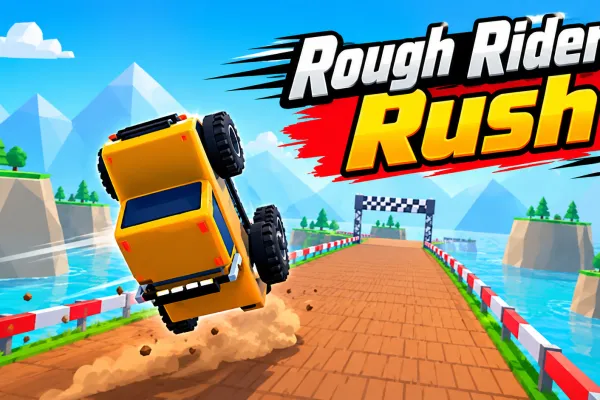
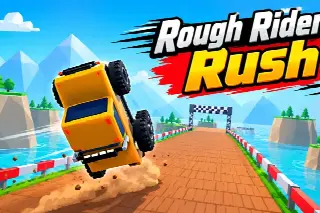



Orange physics car launching from a ramp in an obstacle-course driving game

Rough Rider Rush-Off Road Adventure

Released:
September 2026
Game engine:
HTML5
Platforms:
Browser (Desktop, Mobile, Tablet)
Category:
Driving
Driving physics driving stunt driving obstacle course

Play Next

See All

About Game

Rough Rider Rush is a 3D off-road physics driving game where you pilot a chunky 4x4 pickup across cliff-top tracks surrounded by water. Each course is packed with ramps, gaps, cliff drops, rickety bridges and moving hazards. The truck has working suspension, tyre grip and weight transfer, so every jump, landing and slide plays out through real-time physics. Your goal is to reach the finish line of each track as fast as possible without crashing.

The main objective is to drive from the start gate to the checkered finish arch. You manage speed, steering and the truck's balance through corners, jumps and obstacle sections. Finishing a level unlocks the next one, and checkpoints along the way become your respawn point if things go wrong.

Rough Rider Rush has 120 levels across 13 worlds, set in four environments: Green Valley, Red Canyon, Frost Peaks and Sunset Marsh. Every level has its own track layout and a featured challenge, and the difficulty rises steadily. Tracks narrow, gaps lengthen, guard rails disappear and obstacles speed up as you progress. Courses can include:

  • launch ramps and wide gaps
  • cliff edges where the road ends and you drop onto a lower track
  • sagging plank bridges, some broken and some collapsing behind you
  • concrete wall slaloms and scattered barriers and boulders
  • swinging hammers, spinning sweeper arms, ramming pistons and sliding blocks
  • moving lift platforms that bridge gaps only when they're raised
  • narrow ridges, banked zigzag bends, big hills and bumps

The surface under your tyres matters. Road, dirt, grass, sand, snow, ice, mud and water fords each grip differently. Ice and wet ground make the truck slide, while mud and water drag on your speed.

Use the gas to build speed and the brake to slow down or reverse, and steer left and right through corners. The handbrake locks the rear wheels for sharp turns and slides. In the air, gas tips the nose down and brake lifts it, so you can line the truck up for a clean landing. If you enjoy physics-based driving, you can also explore our driving games for similar challenges, or browse arcade games for other quick-play experiences.

During a run, the screen shows your time, speed and a progress bar with checkpoint markers. Finishing a level opens a results screen with your time, the target time, the number of resets and up to three stars. Stars and best times are saved on your device.

How to Play

  1. Select PLAY from the main menu to continue from your latest level, or pick any unlocked level from LEVELS.
  2. Drive with these controls:
    • Keyboard: W / ↑ gas, S / ↓ brake and reverse, A / D or ← / → steer, Space handbrake, R reset to the last checkpoint, Esc / P pause.
    • Touch: the left and right steering buttons sit on the left side of the screen, with the brake and gas pedals on the right.
  3. Build speed before ramps and gaps, and brake before tight bends rather than in them.
  4. In the air, use gas or brake to level the truck before you land.
  5. Drive through the green CHECKPOINT gates. If you crash, you respawn at the last one you passed.
  6. Time your run past moving hazards and watch for slippery surfaces.
  7. Cross the checkered finish arch to complete the level and see your results.

Winning & Losing Conditions

Winning condition

You complete a level by driving through the finish arch. The game rates your run from one to three stars, saves your best time and unlocks the next level.

Crashes and resets

A crash doesn't end the run. The truck respawns at the last checkpoint after a moment and the clock keeps running. Each reset is added to your reset count. A crash happens when you:

  • fall into the water
  • land on the roof or stay upside down
  • get stuck, wedged or tipped over and unable to move
  • leave the track

You can also press R or tap the reset button to respawn yourself, which also counts as a reset.

Star rating

  • ⭐⭐⭐ Finish within the target time with zero resets.
  • ⭐⭐ Finish within 1.35× the target time with two resets or fewer.
  • ⭐ Finish the level.

Features

  • Full 3D graphics with real-time lighting, shadows and animated reflective water
  • 120 levels across 13 worlds and 4 environments
  • Level selection with progressive unlocking
  • Rigid-body truck physics with suspension, tyre slip, drifting and air control
  • Eight driving surfaces with different grip: road, dirt, grass, sand, snow, ice, mud and water
  • Ramps, gaps and cliff drops onto lower tracks
  • Plank bridges, including broken and collapsing ones
  • Walls, barriers and boulders
  • Hammers, sweepers, pistons, sliders and moving lifts
  • Checkpoints with automatic respawn
  • Time tracking, target times and a reset counter
  • Three-star level ratings and personal best times
  • Progress saved on your device
  • Pause, restart and manual reset
  • Engine, tyre, impact and splash sound effects
  • Settings for sound on/off, graphics quality (Auto, Low, Medium, High) and camera distance (Close or Wide)
  • Automatic performance scaling for smooth play on phones and desktops
  • Responsive layout that rotates to landscape on phones, with transparent touch controls

Tips & Strategies

Carry speed into jumps. Gaps get wider in later levels. Give yourself a full run-up and stay on the gas off the ramp lip.

Level out in the air. Hold brake if the nose rises too high, or gas if it drops, so all four wheels touch down together. Landing nose-first or on two wheels can roll the truck.

Brake before the bend. Slow down on the straight, then power through the corner. Braking mid-corner, especially on ice, sand or mud, makes the truck slide wide.

Respect the surface. Ice has very little grip, so steer gently and lift off early. Mud and water fords drain your speed, so keep the gas down.

Keep moving on collapsing bridges. Planks fall shortly after you touch them, so stopping on one sends you into the water.

Watch moving hazards before committing. Hammers, sweepers, pistons, sliders and lifts all move in repeating patterns. Waiting a second for a clear window is usually faster than a crash and a respawn.

Aim for clean runs. Three stars need both speed and zero resets. If you're chasing stars, a slightly slower, crash-free line beats a risky one.
Controls

Keyboard

KeyAction
W / ↑Accelerate · in the air: tip the nose down
S / ↓Brake, then reverse when stopped · in the air: lift the nose
A / ←Steer left
D / →Steer right
SpaceHandbrake (locks the rear wheels for tight turns and slides)
RReset to the last checkpoint
P / EscPause / resume

Mouse

You can click through every menu with the mouse, and the on-screen reset and pause buttons work during a run. Driving itself uses the keyboard; there are no mouse driving controls.

Touch

ButtonAction
◀ (left side)Steer left
▶ (left side)Steer right
BRAKE (right side)Brake, then reverse when stopped · in the air: lift the nose
GAS (right side)Accelerate · in the air: tip the nose down
↺ (top right)Reset to the last checkpoint
❚❚ (top right)Pause

The touch buttons are transparent so they don't hide the track, and you can press several at once, such as steering while holding gas.

Mobile Support

Yes. On phones and tablets, the touch controls appear automatically. If you hold the phone upright, the game turns itself into landscape view, and on supported browsers tapping Play also switches to full screen. Graphics quality adjusts automatically to keep play smooth.

Desktop Support

Yes. The desktop version uses keyboard controls for driving, braking and reversing, steering, the handbrake, air control, resetting and pausing. It runs at higher graphics settings, including water reflections and soft shadows, and lowers quality automatically if the frame rate drops.

Multiplayer

Single player. Multiplayer is not supported.

Supported Input

Keyboard, touch, and mouse for menus.

Sound

Yes. Sound effects include the engine, tyre skids, impacts, water splashes, a checkpoint chime and a finish fanfare. There is no background music. Settings has a single Sound On/Off switch.

Levels

120 levels across 13 worlds. The first 12 are hand-built, starting with First Tracks and ending with Dead Man's Ridge. They teach jumps, bridges, ice, mud, moving hazards and lifts across the Green Valley, Red Canyon, Frost Peaks and Sunset Marsh worlds. The remaining 108 levels each have their own track layout and a featured challenge, such as cliff drops, wall slaloms, hammers, pistons or narrow ridges. Difficulty rises steadily all the way to level 120.

Score System

No points score. Each run is judged on time and resets:

  • The results screen shows your time, the level's target time, your reset count and a 1–3 star rating.
  • ⭐⭐⭐ Finish within the target time with zero resets.
  • ⭐⭐ Finish within 1.35× the target time with two resets or fewer.
  • ⭐ Finish the level.
  • Your best time and best star rating for each level are saved on your device, and the main menu shows your total stars (out of 360).
  • Finishing a level unlocks the next one, whatever your rating.

FAQ

What is Drive Mad: Extreme Physics Drive?

Drive Mad: Extreme Physics Drive is a physics-based driving game where you control a vehicle through obstacle courses and attempt to reach each level's finish line without crashing.

How do I control the vehicle?

On desktop, use D or Right Arrow to accelerate, A or Left Arrow to brake/reverse, and W, Up Arrow, or Space to jump. The same accelerator and brake controls rotate the vehicle while it is airborne.

How do I win a level?

Reach the finish area at the end of the course. The game then displays your completion time, score, crash count, bonuses, and star rating.

What happens when I crash?

The current attempt ends and a crash screen appears. You can retry the level, open the level-selection screen, or return to the main menu.

Are there checkpoints?

Yes. Some levels contain checkpoints. Reaching one awards 50 points and records the checkpoint position internally, although retrying the level currently starts the level from its original starting point.

How many levels does the game have?

There are exactly 50 levels, with the final stage named DRIVE MAD FINALE.

How does the star rating work?

Three stars require zero crashes and completion in less than 70% of the 60-second par time. Two stars require no more than one crash and completion under the par time; other completed runs receive one star.

Can I play Drive Mad on mobile?

Yes. The game provides dedicated touch buttons for brake, jump, and acceleration on mobile-sized screens.

Rough Rider Rush-Off Road Adventure

Rough Rider Rush-Off Road Adventure

Released: September 2026
Game engine: HTML5
Platforms: Browser (Desktop, Mobile, Tablet)
Category: Driving
Driving physics driving stunt driving obstacle course platform driving arcade driving precision driving rider

About Rough Rider Rush-Off Road Adventure


Rough Rider Rush is a 3D off-road physics driving game where you pilot a chunky 4x4 pickup across cliff-top tracks surrounded by water. Each course is packed with ramps, gaps, cliff drops, rickety bridges and moving hazards. The truck has working suspension, tyre grip and weight transfer, so every jump, landing and slide plays out through real-time physics. Your goal is to reach the finish line of each track as fast as possible without crashing.

The main objective is to drive from the start gate to the checkered finish arch. You manage speed, steering and the truck's balance through corners, jumps and obstacle sections. Finishing a level unlocks the next one, and checkpoints along the way become your respawn point if things go wrong.

Rough Rider Rush has 120 levels across 13 worlds, set in four environments: Green Valley, Red Canyon, Frost Peaks and Sunset Marsh. Every level has its own track layout and a featured challenge, and the difficulty rises steadily. Tracks narrow, gaps lengthen, guard rails disappear and obstacles speed up as you progress. Courses can include:

  • launch ramps and wide gaps
  • cliff edges where the road ends and you drop onto a lower track
  • sagging plank bridges, some broken and some collapsing behind you
  • concrete wall slaloms and scattered barriers and boulders
  • swinging hammers, spinning sweeper arms, ramming pistons and sliding blocks
  • moving lift platforms that bridge gaps only when they're raised
  • narrow ridges, banked zigzag bends, big hills and bumps

The surface under your tyres matters. Road, dirt, grass, sand, snow, ice, mud and water fords each grip differently. Ice and wet ground make the truck slide, while mud and water drag on your speed.

Use the gas to build speed and the brake to slow down or reverse, and steer left and right through corners. The handbrake locks the rear wheels for sharp turns and slides. In the air, gas tips the nose down and brake lifts it, so you can line the truck up for a clean landing. If you enjoy physics-based driving, you can also explore our driving games for similar challenges, or browse arcade games for other quick-play experiences.

During a run, the screen shows your time, speed and a progress bar with checkpoint markers. Finishing a level opens a results screen with your time, the target time, the number of resets and up to three stars. Stars and best times are saved on your device.

How to Play

  1. Select PLAY from the main menu to continue from your latest level, or pick any unlocked level from LEVELS.
  2. Drive with these controls:
    • Keyboard: W / ↑ gas, S / ↓ brake and reverse, A / D or ← / → steer, Space handbrake, R reset to the last checkpoint, Esc / P pause.
    • Touch: the left and right steering buttons sit on the left side of the screen, with the brake and gas pedals on the right.
  3. Build speed before ramps and gaps, and brake before tight bends rather than in them.
  4. In the air, use gas or brake to level the truck before you land.
  5. Drive through the green CHECKPOINT gates. If you crash, you respawn at the last one you passed.
  6. Time your run past moving hazards and watch for slippery surfaces.
  7. Cross the checkered finish arch to complete the level and see your results.

Winning & Losing Conditions

Winning condition

You complete a level by driving through the finish arch. The game rates your run from one to three stars, saves your best time and unlocks the next level.

Crashes and resets

A crash doesn't end the run. The truck respawns at the last checkpoint after a moment and the clock keeps running. Each reset is added to your reset count. A crash happens when you:

  • fall into the water
  • land on the roof or stay upside down
  • get stuck, wedged or tipped over and unable to move
  • leave the track

You can also press R or tap the reset button to respawn yourself, which also counts as a reset.

Star rating

  • ⭐⭐⭐ Finish within the target time with zero resets.
  • ⭐⭐ Finish within 1.35× the target time with two resets or fewer.
  • ⭐ Finish the level.

Features

  • Full 3D graphics with real-time lighting, shadows and animated reflective water
  • 120 levels across 13 worlds and 4 environments
  • Level selection with progressive unlocking
  • Rigid-body truck physics with suspension, tyre slip, drifting and air control
  • Eight driving surfaces with different grip: road, dirt, grass, sand, snow, ice, mud and water
  • Ramps, gaps and cliff drops onto lower tracks
  • Plank bridges, including broken and collapsing ones
  • Walls, barriers and boulders
  • Hammers, sweepers, pistons, sliders and moving lifts
  • Checkpoints with automatic respawn
  • Time tracking, target times and a reset counter
  • Three-star level ratings and personal best times
  • Progress saved on your device
  • Pause, restart and manual reset
  • Engine, tyre, impact and splash sound effects
  • Settings for sound on/off, graphics quality (Auto, Low, Medium, High) and camera distance (Close or Wide)
  • Automatic performance scaling for smooth play on phones and desktops
  • Responsive layout that rotates to landscape on phones, with transparent touch controls

Tips & Strategies

Carry speed into jumps. Gaps get wider in later levels. Give yourself a full run-up and stay on the gas off the ramp lip.

Level out in the air. Hold brake if the nose rises too high, or gas if it drops, so all four wheels touch down together. Landing nose-first or on two wheels can roll the truck.

Brake before the bend. Slow down on the straight, then power through the corner. Braking mid-corner, especially on ice, sand or mud, makes the truck slide wide.

Respect the surface. Ice has very little grip, so steer gently and lift off early. Mud and water fords drain your speed, so keep the gas down.

Keep moving on collapsing bridges. Planks fall shortly after you touch them, so stopping on one sends you into the water.

Watch moving hazards before committing. Hammers, sweepers, pistons, sliders and lifts all move in repeating patterns. Waiting a second for a clear window is usually faster than a crash and a respawn.

Aim for clean runs. Three stars need both speed and zero resets. If you're chasing stars, a slightly slower, crash-free line beats a risky one.
Game Controls


Keyboard

KeyAction
W / ↑Accelerate · in the air: tip the nose down
S / ↓Brake, then reverse when stopped · in the air: lift the nose
A / ←Steer left
D / →Steer right
SpaceHandbrake (locks the rear wheels for tight turns and slides)
RReset to the last checkpoint
P / EscPause / resume

Mouse

You can click through every menu with the mouse, and the on-screen reset and pause buttons work during a run. Driving itself uses the keyboard; there are no mouse driving controls.

Touch

ButtonAction
◀ (left side)Steer left
▶ (left side)Steer right
BRAKE (right side)Brake, then reverse when stopped · in the air: lift the nose
GAS (right side)Accelerate · in the air: tip the nose down
↺ (top right)Reset to the last checkpoint
❚❚ (top right)Pause

The touch buttons are transparent so they don't hide the track, and you can press several at once, such as steering while holding gas.

Mobile Support

Yes. On phones and tablets, the touch controls appear automatically. If you hold the phone upright, the game turns itself into landscape view, and on supported browsers tapping Play also switches to full screen. Graphics quality adjusts automatically to keep play smooth.

Desktop Support

Yes. The desktop version uses keyboard controls for driving, braking and reversing, steering, the handbrake, air control, resetting and pausing. It runs at higher graphics settings, including water reflections and soft shadows, and lowers quality automatically if the frame rate drops.

Multiplayer

Single player. Multiplayer is not supported.

Supported Input

Keyboard, touch, and mouse for menus.

Sound

Yes. Sound effects include the engine, tyre skids, impacts, water splashes, a checkpoint chime and a finish fanfare. There is no background music. Settings has a single Sound On/Off switch.

Levels

120 levels across 13 worlds. The first 12 are hand-built, starting with First Tracks and ending with Dead Man's Ridge. They teach jumps, bridges, ice, mud, moving hazards and lifts across the Green Valley, Red Canyon, Frost Peaks and Sunset Marsh worlds. The remaining 108 levels each have their own track layout and a featured challenge, such as cliff drops, wall slaloms, hammers, pistons or narrow ridges. Difficulty rises steadily all the way to level 120.

Score System

No points score. Each run is judged on time and resets:

  • The results screen shows your time, the level's target time, your reset count and a 1–3 star rating.
  • ⭐⭐⭐ Finish within the target time with zero resets.
  • ⭐⭐ Finish within 1.35× the target time with two resets or fewer.
  • ⭐ Finish the level.
  • Your best time and best star rating for each level are saved on your device, and the main menu shows your total stars (out of 360).
  • Finishing a level unlocks the next one, whatever your rating.

Frequently Asked Questions

Drive Mad: Extreme Physics Drive is a physics-based driving game where you control a vehicle through obstacle courses and attempt to reach each level's finish line without crashing.

On desktop, use D or Right Arrow to accelerate, A or Left Arrow to brake/reverse, and W, Up Arrow, or Space to jump. The same accelerator and brake controls rotate the vehicle while it is airborne.

Reach the finish area at the end of the course. The game then displays your completion time, score, crash count, bonuses, and star rating.

The current attempt ends and a crash screen appears. You can retry the level, open the level-selection screen, or return to the main menu.

Yes. Some levels contain checkpoints. Reaching one awards 50 points and records the checkpoint position internally, although retrying the level currently starts the level from its original starting point.

There are exactly 50 levels, with the final stage named DRIVE MAD FINALE.

Three stars require zero crashes and completion in less than 70% of the 60-second par time. Two stars require no more than one crash and completion under the par time; other completed runs receive one star.

Yes. The game provides dedicated touch buttons for brake, jump, and acceleration on mobile-sized screens.

Play next
Unique100 Menu
Categories